TV
Use the TV remote to watch regular TV channels or switch to the Amazon Fire TV / other HDMI devices.
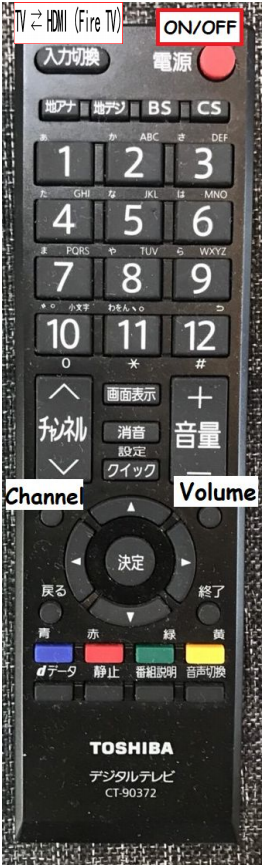
TV Remote Control
- Press 「電源」 to turn the TV on or off.
- Use 「チャンネル」 to change regular TV channels.
- Use 「音量」 to adjust the volume.
- Press 「入力切換」 to switch the input source. Select the HDMI input connected to Amazon Fire TV to watch streaming services.
- You can also use 「入力切換」 to switch to another HDMI device, such as a game console or your own device, if connected.
- Use the arrow buttons and 「決定」 to select an input or menu item.
If the screen says “No signal,” press 「入力切換」 and choose the correct HDMI input again. Please do not unplug the connected devices unless necessary.